Last updated: October 19, 2026
By RavenSkye Editorial. Specs come from manufacturer and Amazon listings; this is not a lab test. Prices change—check Amazon for current pricing.
As an Amazon Associate I earn from qualifying purchases.
Short answer: Thunderbolt 4 and USB4 docks both use 40Gbps Type-C. Thunderbolt 4 is Intel’s stricter certification (minimum dual 4K support, 15W to accessories, and PCIe tunneling). USB4 docks vary more by vendor—check dual-display outputs and PD watts on the listing. A Thunderbolt 4 laptop works with many USB4 docks and vice versa when both ends support USB4/TBT4.




Thunderbolt 4 vs USB4 at a glance
- Same pipe speed: both top out at 40Gbps over USB-C when correctly implemented.
- Thunderbolt 4: Intel certification floor—dual 4K (or one 8K), at least 15W accessory power, PCIe, and stricter cable/dock rules.
- USB4: the USB-IF standard; docks and hosts can ship with different display and power feature sets. Read the dual-monitor and charging claims carefully.
- Cross-compatibility: many TBT4 hosts work with USB4 docks (and the reverse) when both sides speak USB4/TBT4—still verify displays and PD watts for your laptop.
Quick picks
- Thunderbolt 4 reference desk dock: CalDigit TS4
- USB4 multi-display dock: Anker 568 USB4
- Dell Thunderbolt 4 fleet dock: Dell WD22TB4
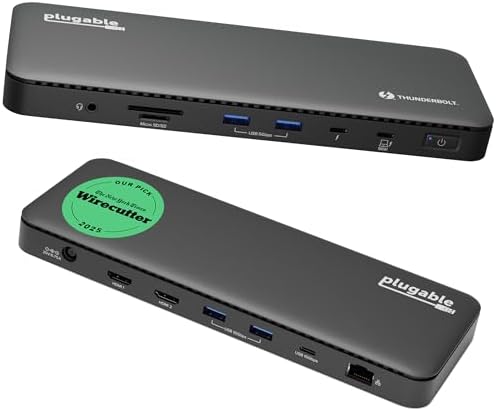
- Dual-monitor TBT4: Plugable Thunderbolt 4 Dock
- Dual 4K TBT4 value: UGREEN 8-in-1 Thunderbolt 4 Dock
- Compact Thunderbolt expansion: OWC Thunderbolt Hub
1. CalDigit TS4 — Thunderbolt 4 reference dock
Eighteen ports, triple Thunderbolt 4, up to 98W laptop charging, and multi-display support (manufacturer listing). This is the full-desk Thunderbolt 4 baseline many IT buyers compare against.
Best for: Windows and Intel Mac workstations that want a certified Thunderbolt 4 dock with lots of ports. Not for: Buyers who only need a small hub or travel adapter.
2. Anker 568 USB4 — flexible USB4 docking station
USB4 11-in-1 dock with up to 100W charging, 40Gbps data, Ethernet, and multi-display options including single 8K or triple 4K on supported hosts (manufacturer listing). Specs vary by laptop GPU and USB4 implementation—check dual-display and PD watts on the listing.
Best for: Windows USB4 laptops that want dock features without requiring a Thunderbolt logo. Not for: Hosts that only advertise USB-C 10Gbps (not USB4/TBT4).
3. Dell WD22TB4 — Thunderbolt 4 for Dell fleets
Dell’s Thunderbolt 4 dock (WD22TB4) for supported Dell and Thunderbolt 4 laptops (manufacturer listing). Useful when you want Dell ecosystem drivers and fleet consistency.
Best for: Dell laptop fleets and mixed Thunderbolt 4 Windows desks. Not for: Non-Dell Macs that prefer CalDigit/OWC-style port layouts (still check compatibility).
4. Plugable Thunderbolt 4 Dock — dual-monitor TBT4
Thunderbolt 4 dock with 100W charging and dual-monitor support (manufacturer listing). A straightforward certified TBT4 option when you want dual displays from one cable.
Best for: Thunderbolt 4 laptops that need dual monitors and laptop power. Not for: Ultra-budget USB-C-only laptops without Thunderbolt/USB4.
5. UGREEN 8-in-1 Thunderbolt 4 Dock — dual 4K value
Eight-in-one Thunderbolt 4 dock with dual 4K@60Hz and triple Thunderbolt 4 ports at 40Gbps (manufacturer listing). A compact TBT4 pick when dual 4K is the main requirement.
Best for: Dual 4K desks on Thunderbolt 4 hosts. Not for: Setups that need the densest port count of a full TS4-class dock.
6. OWC Thunderbolt Hub — compact Thunderbolt expansion
Five-port Thunderbolt hub for expanding Thunderbolt devices and daisy-chains (manufacturer listing). More of a hub than a full docking station—pair with displays/adapters as needed.
Best for: Mac and Thunderbolt users who need more Thunderbolt ports, not a full desk dock. Not for: Buyers who need HDMI/DisplayPort, Ethernet, and SD in one brick.
How to choose
- Need guaranteed dual 4K and a Thunderbolt logo on laptop + dock → prefer a certified Thunderbolt 4 dock (TS4, WD22TB4, Plugable, UGREEN TBT4).
- Have a USB4 Windows laptop and want dock features without paying for the Thunderbolt badge → compare USB4 docks like the Anker 568, then confirm dual-display and PD watts.
- Only need more Thunderbolt ports for daisy-chain storage/displays → OWC Thunderbolt Hub.
- Still deciding hub vs full dock → see USB-C hub vs docking station.
- Cable matter → use a certified Thunderbolt/USB4 cable; see Thunderbolt vs USB-C cable for a dock.
- Wondering about Thunderbolt 5 → Is Thunderbolt 5 worth it?
FAQ
Can a Thunderbolt 4 laptop use a USB4 dock?
Often yes, when the dock and host both support USB4/Thunderbolt 4 signaling. Always check the dock’s dual-display and power-delivery claims against your laptop.
Is Thunderbolt 4 the same as USB4?
They share the same 40Gbps Type-C pipe family, but Thunderbolt 4 adds Intel’s minimum feature floor (dual 4K, accessory power, PCIe). USB4 products can vary more by vendor.
Do I need Thunderbolt 5 right now?
Only if you already have Thunderbolt 5 hosts and need higher bandwidth. Most dual-4K desks are fine on Thunderbolt 4 / USB4 today—see our Thunderbolt 5 guide linked above.
Related: Best Thunderbolt/USB4 dual-4K docks · Best USB4 docks for dual 4K Windows · Hub vs dock · Thunderbolt vs USB-C cable · Thunderbolt 5 · Home
Disclosure: As an Amazon Associate I earn from qualifying purchases. Product cards and outbound Amazon links are affiliate links. Tag: onsight068-20.