Last updated: September 28, 2026
Research guide for Dell Latitude / Precision / XPS fleets that care about ExpressCharge, modular WD docks, and dual/triple display. Specs from Dell docs + cross-checked listings — not a hands-on lab yet.
As an Amazon Associate I earn from qualifying purchases.
Dell fleets fail docking projects when IT buys a “universal” dock that only delivers ~65–90W and trips weak-charger warnings. On supported Latitudes and Precisions, Dell Thunderbolt docks unlock a higher ExpressCharge path (often up to ~130W) that generic TB4 docks do not fully replace.
Best for: IT and power users standardizing desks on Dell WD22TB4 / WD25-class Thunderbolt docks with DP + HDMI already on the chassis.
Not for: Mac-first creative desks that need SD UHS-II + 2.5GbE density (buy CalDigit), or Chromebook-only fleets.
Short answer: For Dell Latitude and Precision fleets that need ExpressCharge, the Dell WD22TB4 is the lead dock to standardize on.
FAQ
Will the Dell WD22TB4 charge a MacBook at Dell ExpressCharge wattage?
No. On non-Dell hosts it falls back to standard USB-C power delivery.
Should a new Thunderbolt 4 Dell notebook use the WD19TBS or the WD22TB4?
Prefer the WD22TB4 for new Thunderbolt 4 Dell purchases. Keep the WD19TBS only if you are sustaining an existing WD19 fleet.
When should a Dell desk skip Dell docks?
Mixed Mac and Dell desks that need SD card readers and 2.5GbE are better served by the CalDigit TS4, which uses standard power delivery rather than Dell ExpressCharge.




Quick picks
- Best fleet default today: Dell WD22TB4
- Previous-gen TB still in the field: Dell WD19TBS
- Newer Dell Pro Thunderbolt line: WD25TB4 / SD25TB4 class and WD25TB5 (TB5) where hosts support it
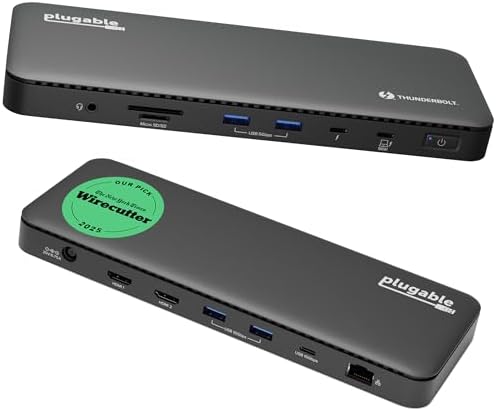
- Non-Dell premium escape hatch: CalDigit TS4 or Plugable TBT4-UD5 (standard PD, not full ExpressCharge)
ExpressCharge in one paragraph
Dell’s higher wattage path is negotiated between a supported Dell notebook and a Dell WD Thunderbolt dock + Dell power adapter. On non-Dell hosts (or with third-party TB4 docks), you typically fall back to standard USB-C PD — often enough for thin XPS machines, not always for high-TGP Precisions. Always check Dell’s dock compatibility matrix for your service tag.
1. Dell WD22TB4 — lead pick
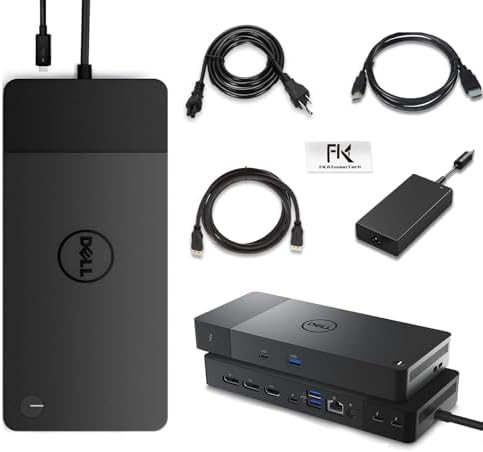
Thunderbolt 4, dual DisplayPort + HDMI, modular heritage from the WD19 family, and the ExpressCharge story fleets actually buy. Dual 4K@60 is realistic on TB4 Dell hosts when cables and monitors cooperate.
Best for: Latitude/Precision standardization.
Not for: Mac creators who need CalDigit’s port zoo.
2. WD22TB4 alternate listings / bundles
Amazon often carries WD22TB4 via multiple sellers/bundles (adapter + DP/HDMI cables). Prefer listings that clearly include the Dell 180W-class adapter if you need the full ExpressCharge path. Verify seller authenticity and warranty terms.
3. Dell WD19TBS — still common in existing fleets
Thunderbolt (WD19TBS) remains widely deployed. Fine to keep purchasing for mixed fleets that already standardized on WD19, but new TB4-capable notebooks should prefer WD22TB4 / WD25-class docks for longevity.
4. Newer Dell Pro: SD25TB4 / WD25TB5
Dell’s newer Pro Thunderbolt 4 smart docks and Thunderbolt 5 WD25TB5 move fleets forward (higher Ethernet tiers, updated PD, future TB5 hosts). Buy these when your refresh cycle includes TB5-capable Precisions/XPS — not as a magic upgrade for older USB-C-only Latitudes.
5. When to leave Dell docks
If the desk is mixed Mac + Dell, or you need SD UHS-II + 2.5GbE + insane port counts, CalDigit TS4 wins on ports while Plugable TBT4-UD5 wins on simpler dual-HDMI TB4. Expect standard PD, not Dell ExpressCharge.
Buying tips for fleets
- Lock one dock SKU per notebook generation using Dell’s compatibility PDF.
- Order docks with the correct wattage adapter — undervolted adapters create ticket noise.
- Standardize on DP or HDMI to the monitor farm; avoid random MST hubs on top of docks.
- Keep a small pool of universal TB4 docks for contractors’ non-Dell laptops.
FAQ
Will WD22TB4 give 130W on a MacBook?
No — expect standard USB-C PD behavior on non-Dell hosts.
WD19TBS vs WD22TB4?
Prefer WD22TB4 for new TB4 Dell purchases; WD19TBS for sustaining an existing WD19 fleet.
Do I need Thunderbolt 5 now?
Only if your 2025–2026 refresh includes TB5 hosts and you want headroom; TB4 still covers dual 4K fleets.
Related: Dual-4K docks hub · Home
Keep comparing: the Dell WD22TB4 review covers ExpressCharge caveats in one place. If the refresh is Thunderbolt 5, read is Thunderbolt 5 worth it before standardizing. Disclosure: As an Amazon Associate I earn from qualifying purchases. Boxes and links are paid links.
Pingback: Docking Station Not Charging Laptop? Fixes | RavenSkye